
Theme
Pagos y facturación
DueñoExclusivo del DueñoThis section controls your business's subscription to Nexta. It is different from the Facturas module of the business — those are the invoices you issue to your customers; these are the invoices Nexta issues to you.
Only the Dueño
Billing is the Dueño's responsibility. An Administrador can see the tab but the buttons to change plan or manage payment are disabled for them. Trabajador and Cliente do not even see the tab.
Plans and prices
| Plan | Monthly price | Who it's for |
|---|---|---|
| Free | $0 COP | Trying Nexta with POS and an informational public menu. |
| Starter | $49.900 COP | A business in operation with more capacity and internal reservations. |
| Pro | $119.900 COP | An established restaurant with KDS, audit log and advanced reports. |
| Enterprise | $299.900 COP | Chains, franchises and multi-branch. Everything unlimited. |
See Límites y funciones por plan for the full detail of quotas and features.
14 free days to start
When you create your business you start with a 14-day trial period with no card required. You operate as FREE during that time. When it ends you choose a plan or your business becomes Suspendido.
Automatic renewal
Once you subscribe to a paid plan, it renews automatically every month from the date you first paid. For example, if you pay on June 15, you are charged on July 15, August 15, etc.
The charge:
- Uses the same card you loaded the first time.
- Is processed automatically without you having to do anything.
- If the charge fails (expired card, insufficient funds), you receive an email and the business enters the Pendiente de pago state. You have until the end of the cycle to update the card before it becomes Suspendido.
Reminders before the charge
We notify you by email + in-app notification twice before each renewal:
| When | Channel | Message |
|---|---|---|
| 3 days before | Email + in-app (severity warning) | "Tu plan PRO se renueva en 3 días" |
| 1 day before | Email + in-app (severity error) | "⏰ Tu plan PRO se renueva mañana" |
In-app reminders only reach the Dueño — admins, workers and customers do not see them. It is sensitive billing information.
If you canceled the renewal but still have access, you see a different reminder: "Tu plan termina pronto" with a button to reactivate.
The Facturación screen
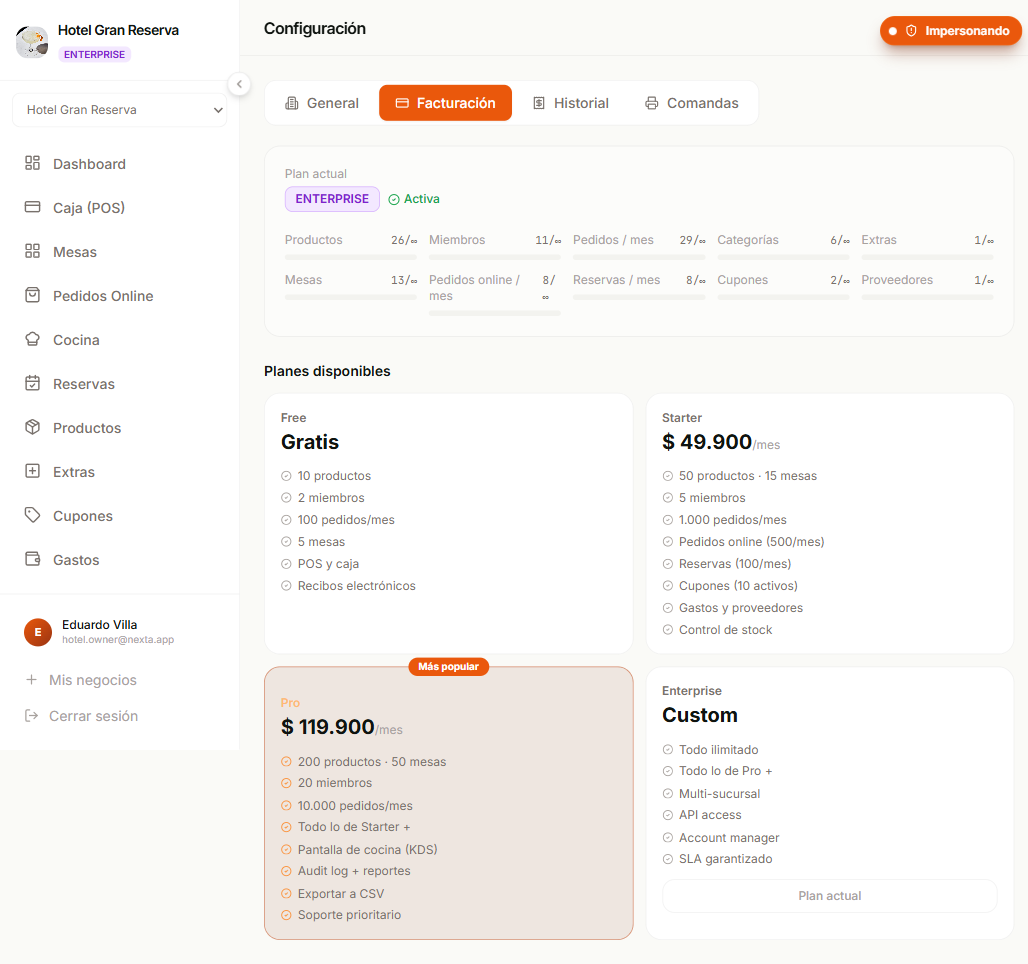
Go to Configuración → Facturación. You will see:
Your current plan
Main card with:
- Plan badge (
FREE/STARTER/PRO/ENTERPRISE) - Status:
Activo/Período de prueba/Suspendido/Cancelado - 10 quota bars showing current usage vs limit (products, members, orders, categories, extras, tables, reservations, coupons, distributors)
- Gestionar facturación button (only if you have a real active Stripe subscription)
Inherited plan in branches
If you open Facturación inside a branch of an ENTERPRISE business, you will see the plan inherited from the main business and the "Gestionar facturación" button takes you to the principal's subscription (where it really lives).
Available plans
The 4 cards (Free, Starter, Pro, Enterprise) with:
- Price in COP
- List of included features
- Actualizar button (if it is a higher plan than yours) or Plan actual (if you are already there)
- Más popular on Pro
Historial (separate tab)
List of invoices Nexta issued to you. Each one with:
| Column | What it shows |
|---|---|
| Número | Invoice sequence number |
| Período | Month it covers |
| Monto | What you paid (in COP) |
| Estado | Pagada / Pendiente / Fallida / Anulada |
| Acciones | Descargar PDF + Ver online |
Subscribe to a paid plan
- Configuración → Facturación
- On the card of the plan you want → click Actualizar
- It redirects you to Stripe Checkout — the secure payment portal
- You fill in card + basic details
- You confirm → the charge is processed instantly
- You return to Nexta with a green toast: "¡Pago confirmado!"
- Your plan changes immediately and the new limits/features are activated
Card security
Your card data never passes through Nexta — it lives in Stripe (PCI-DSS compliant). On your screen we only see the last 4 digits so you know which card is active.
Change plan
Move up (upgrade)
- Choose the higher plan → Actualizar
- Stripe charges proportionally to the time remaining in the current cycle (automatic proration)
- The new limits and features apply immediately
Move down (downgrade)
- Gestionar facturación button → Stripe portal
- You choose the lower plan
- The change takes effect at the end of the current cycle — nothing is charged or refunded
- Until the change, you keep the limits of the higher plan
Careful when downgrading
If your business has more resources than the lower plan's limit (more products, more members, etc.), features don't break — but you can't create more until you reduce. E.g. if you go from PRO (200 products) to STARTER (50), you can't create product 51 until you archive 150.
Gated features (KDS, audit log, etc. on PRO+) are deactivated when the cycle changes. Workers and admins see the paywall in those modules.
Cancel and reactivate the subscription
From inside Nexta, in Configuración → Historial, you have three buttons depending on your subscription's state:
| Your subscription is... | You see the button... | What it does |
|---|---|---|
| Active, with automatic renewal | Cancelar suscripción | Schedules the cancellation at the end of the current period. It does not downgrade your plan yet. |
| Active but with a scheduled cancellation | Reactivar suscripción | Reactivates automatic renewal. You go back to the normal flow. |
| Expired / Suspended / Canceled | Suscribirse de nuevo | Takes you to checkout to pay again and reactivate the plan. |
How Cancel works
- Configuración → Historial → Cancelar suscripción.
- You confirm in the dialog that appears.
- The plan is NOT downgraded instantly. You keep full access until the end of the current period (the "Próximo cobro" date).
- The system marks your subscription as "Cancelación programada — no se renovará el [fecha]" — you will see an orange banner in the section.
- When that date arrives, the plan automatically becomes SUSPENDED.
How Reactivate works
If you change your mind before the current period ends:
- Configuración → Historial → Reactivar suscripción.
- The cancellation flag is removed. Your plan renews normally on the next charge date.
No penalty
Canceling and reactivating before expiration has no cost or penalty. Useful if you took a month to evaluate Nexta and want to wait until the end of the cycle before deciding.
How Subscribe again works
If the period has already passed and your business is Suspendido or Cancelado:
- Configuración → Historial → Suscribirse de nuevo.
- It takes you to the Facturación tab to choose a plan and pay.
- You pay → the plan is reactivated immediately with all your data intact (if you are within the 90-day window — see below).
Your data stays saved
After canceling, your data stays saved for 90 days. If you come back within that window and reactivate a plan, you recover everything intact. After 90 days, the data is permanently deleted.
Manage the payment card
- Configuración → Facturación → Gestionar facturación
- In the Stripe portal → Payment methods
- Add/change card
- The next charge uses the new one
Expired card or insufficient funds
If a charge fails, you receive an email and the subscription moves to the Pendiente de pago (PAST_DUE) state. Stripe automatically retries for 3 days with backoff. In the meantime:
- Features stay active (service is not cut off immediately).
- You see a red banner in the app.
- If the retries fail, the business becomes Suspendido and nobody can operate until the card is updated.
Download invoices
For each invoice in the Historial list:
- Descargar PDF — downloads the formal PDF with your tax details for accounting.
- Ver online — opens the invoice hosted on Stripe (useful to verify it without downloading).
Invoices issued by Nexta are Stripe international invoices (not Colombian DIAN electronic invoicing). If you need DIAN electronic invoicing to deduct the expense in your Colombian accounting, contact us.
Frequently asked questions
What happens if my business is suspended and I need to regain access?
Pay the plan from Facturación. As soon as the charge is processed (seconds), access returns instantly.
Why don't I see the "Gestionar facturación" button?
It only appears when your business has a real active Stripe subscription. If your plan was assigned manually (by the Nexta team, or if you are a branch of an ENTERPRISE business), you don't need a portal — management lives in the main business.
Can I change plans in the middle of the cycle?
Yes. If you move up, the proration of what is left of the cycle is charged. If you move down, the change applies at the end of the current cycle.
How much does an additional branch cost on ENTERPRISE?
Zero. One ENTERPRISE subscription covers all the branches you create. See Sucursales.
Can I pay by bank transfer instead of card?
Today we only charge by card (credit or debit) via Stripe. For special cases (Enterprise contracts, public budgets), write to us at soporte@nextapos.com.
My card doesn't accept international charges?
Stripe processes the payments. Some Colombian cards require enabling international charges with your bank. If you can't enable it, use a virtual card (Nubank, Movii, etc.) or coordinate an alternative method with support.
How many days after a failed charge is my business suspended?
Stripe retries for 3 days with backoff. After 3 days without a successful payment, the business becomes Suspendido.
I canceled but want to recover my account before the 90 days
Log in and you will see a banner to reactivate. You choose a plan, pay, and everything comes back where you left it.
Next step
- Límites y funciones por plan — what each plan includes in detail.
- Sucursales — multi-branch with the ENTERPRISE plan.
- Equipo — invite workers (the plan defines how many you can have).
- Configuración del negocio — business details (NIT, address) that appear on your invoices to customers.