
Theme
Sucursales (multi-tenant)
DueñoSolo Dueño con plan ENTERPRISEAvailable only on the ENTERPRISE plan
Multi-branch is exclusive to the ENTERPRISE plan ($299.900 COP/month). One subscription covers all the branches you create — without paying for another.
What a branch is
A branch is an independent business (its own catalog, team, POS, tables, orders) but administratively grouped under a main business. Designed for:
- Hotel chains with several locations
- Restaurant franchises
- Cafés with multiple points of sale
- Distributors with regional stores
Each branch operates independently:
- Its own products, prices and categories
- Its own team (different OWNERs/ADMINs/WORKERs)
- Separate POS, cash register, tables and orders
- Its own public URL (
nextapos.com/menu/sucursal-norte)
But they share:
- A single ENTERPRISE subscription — you pay once, all of them get everything unlimited
- An aggregated view to see metrics for the whole group
Vocabulary
- Principal (root): the business that pays the ENTERPRISE subscription. It is the "parent" of the branches.
- Sucursal (branch): a business created under a principal. It inherits the plan automatically.
- Independiente: a business with no branches and no parent (any plan).
Visually in the superadmin you will see badges:
- Principal · N — has N branches under its umbrella
- Sucursal — with an arrow to the principal it depends on
How to create a branch
- Log in as OWNER of a business on the ENTERPRISE plan.
- In the sidebar you will see an item Sucursales (icon ).
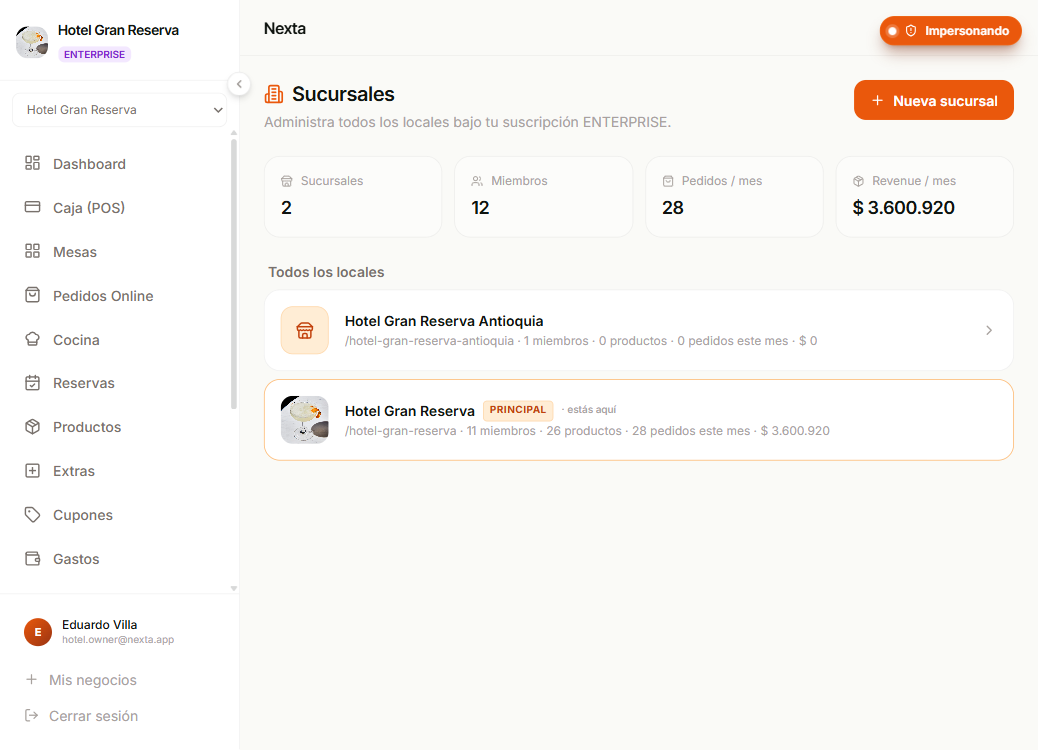
- Click → you arrive at the screen with:
- 4 aggregated KPIs for the whole family (branches, total members, orders of the month, revenue of the month)
- A list of all the branches with their individual metrics
- Click + Nueva sucursal
- In the modal:
- Nombre del local (e.g. "Sucursal Norte", "Hotel Cartagena Centro")
- URL pública (slug auto-generated from the name, you can edit it)
- Crear sucursal
The new branch:
- Appears in your list immediately
- Inherits the ENTERPRISE plan automatically — all features available
- Starts with an empty catalog and team
- Is accessible at
nextapos.com/app/<slug>/dashboard
How to switch between branches
You have 3 paths depending on where you are:
From the sidebar of any branch
If you have a membership in 2+ tenants (branches), a selector with all of them appears at the top of the sidebar. Pick one and jump.
From the bottom of the sidebar → "Mis negocios"
Takes you to /workspaces with all your options (including any role you have in other tenants, not just branches).
From the "Sucursales" screen (only if you are OWNER of the principal)
Click directly on any card → you go to that branch's dashboard.
Aggregated metrics
On the Sucursales screen (only OWNER of the principal), at the top you see 4 KPIs that add up all the branches:
- Sucursales — total locations (principal + branches)
- Miembros — sum of the teams of all the branches
- Pedidos / mes — paid orders of the current month across the whole family
- Revenue / mes — total billed from paid sales of the month in COP
Each individual branch card also shows its metrics for the month so you can compare.
Roles and permissions
| Action | OWNER of the principal | OWNER of a branch | ADMIN | WORKER |
|---|---|---|---|---|
| View the list of branches | Yes | — | — | — |
| Create a new branch | Yes | — | — | — |
| Operate inside each branch according to their role | Yes | Yes (only in their own) | Yes | Yes |
| Manage billing of the ENTERPRISE account | Yes | — | — | — |
| View the account's invoice history | Yes | — | — | — |
When someone goes into Configuración → Facturación of a branch:
- They see the inherited ENTERPRISE plan
- They see the quotas (all unlimited)
- The "Gestionar facturación" button opens the Stripe portal of the principal (where the real subscription lives)
Team across branches
Each branch has its own team. But the same user can be a member of several branches with different roles:
Eduardo Villa is OWNER of the principal Hotel Gran Reserva, but is also ADMIN at the branch Hotel Cartagena Centro.
You manage this like any other tenant — from the Equipo section of each branch, you invite users by email. If the user already has a Nexta account (because they are in another tenant), they are added automatically. If not, they receive an invitation email to create a password.
What happens when…
…I delete a branch
It only affects that branch. The principal and the other branches are untouched. Careful: all products, orders, team and data of that branch are deleted.
…I cancel the principal's ENTERPRISE subscription
The branches lose the inherited plan when the cycle ends. Each branch is left with its nominal plan (FREE by default). ENTERPRISE features stop being available on all of them.
If you want to keep a branch operational after canceling, turn it into an independent business: contact support to "unlink" it from the principal.
…I move the principal down from ENTERPRISE to PRO
The branches inherit the new PRO plan. They lose ENTERPRISE-exclusive features (multi-branch admin, API access).
…I delete the principal
The branches lose the relationship (parentTenantId becomes null) and keep their nominal plan (the ENTERPRISE that we copied when creating them). In practice they keep working with all features, but there is no longer a "principal" grouping them.
Current limitations
- Single hierarchy: a branch cannot have sub-branches. Only principal → branches (1 level).
- No data transfer between branches (products, customers, etc.). If you need that, contact support.
- No detailed consolidated reports yet (only the 4 aggregated KPIs). If you need deep dashboards per branch, it is on the roadmap.
Next step
- Pagos y facturación — managing the ENTERPRISE subscription.
- Equipo — invite members to a specific branch.
- Límites y funciones por plan — what ENTERPRISE includes.